


试卷切题与识别(多模态)
更新时间:2026-06-03
接口描述
支持对整页试卷、习题册、作业本等场景进行全自动题目切分,并基于多模态大模型能力,准确识别手写、公式、英语等题目内容。可快速接入拍照搜题、题库录入、智能批改等业务场景,显著降低人工录入成本,提升题目处理效率与识别准确率。
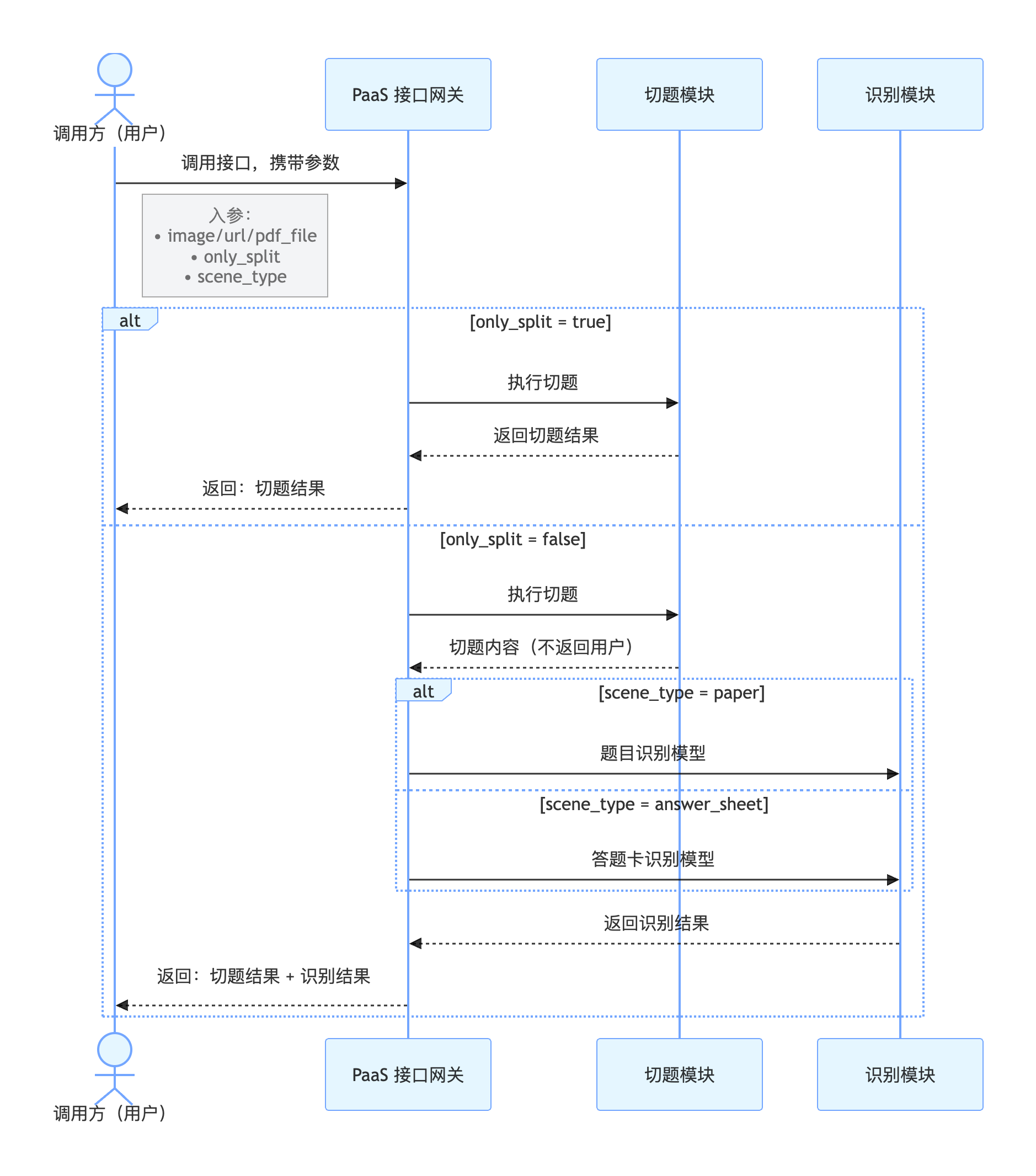
题目切分+识别:异步接口,需要先调用提交请求接口获取 task_id ,然后调用获取结果接口进行结果轮询,建议提交请求后 5~10 秒轮询。提交请求接口QPS为2,获取结果接口QPS为10,需将请求参数only_split设置为false。
仅题目切分:同步接口,提交后同步返回切题结果,需将请求参数only_split设置为true。
在线调试
您可以在 示例代码中心 中调试该接口,可进行签名验证、查看在线调用的请求内容和返回结果、示例代码的自动生成。
提交请求接口
请求说明
请求示例
HTTP 方法:POST
请求URL: https://aip.baidubce.com/rest/2.0/ocr/v1/paper_cut_edu_vlm/create_task
URL参数:
| 参数 | 值 |
|---|---|
| access_token | 通过API Key和Secret Key获取的access_token,参考“Access Token获取” |
Header如下:
| 参数 | 值 |
|---|---|
| Content-Type | application/json |
Body中放置请求参数,参数详情如下:
请求参数
| 参数 | 是否必选 | 类型 | 可选值范围 | 说明 |
|---|---|---|---|---|
| image | 和 url/pdf_file 三选一 | string | - | 图像数据,base64编码后进行urlencode,要求base64编码和urlencode后大小不超过10M,最短边至少15px,最长边最大8192px,支持jpg/jpeg/png/bmp格式优先级:image > url > pdf_file,当image字段存在时,url、pdf_file字段失效 |
| url | 和 image/pdf_file 三选一 | string | - | 图片完整url,url长度不超过1024字节,url对应的图片base64编码后大小不超过10M,最短边至少15px,最长边最大8192px,支持jpg/jpeg/png/bmp格式优先级:image > url > pdf_file,当image字段存在时,url字段失效请注意关闭URL防盗链 |
| pdf_file | 和 image/url 三选一 | string | - | PDF文件,base64编码后进行urlencode,要求base64编码和urlencode后大小不超过10M,最短边至少15px,最长边最大8192px优先级:image > url > pdf_file,当image、url字段存在时,pdf_file字段失效 |
| pdf_file_num | 否 | string | - | 需要识别的PDF文件的对应页码,当 pdf_file 参数有效时,识别传入页码的对应页面内容,若不传入,则默认识别第 1 页 |
| only_split | 否 | bool | true/false | 是否仅进行题目切分,默认不打开,即:false。可选值包括:- true :开启,返回单题位置信息以及题内手写答案位置信息,按照同步方式返回- false:不开启,返回单题位置信息以及题内结构化文本信息,按照异步方式返回 |
| scene_type | 是 | string | paper/answer_sheet 二选一 | 指定传入文件的场景类型,默认使用paper- paper:试卷题目识别场景- answer_sheet :答题卡识别场景 |
| enhance | 否 | bool | true/false | 是否开启矫正增强,默认关闭 |
返回说明
返回参数
| 字段 | 类型 | 说明 |
|---|---|---|
| log_id | uint64 | 唯一的log id,用于问题定位 |
| error_code | int | 错误码 |
| error_msg | string | 错误描述信息 |
| result | dict | 返回的结果列表 |
| + task_id | string | 该请求生成的任务ID,后续使用该task_id获取批改结果 |
返回示例
成功返回示例:
{
    "error_code": "0",
    "error_msg": "",
    "result": {
        "task_id": "1996199501805445169"
    },
    "log_id": 1996199501805445169
}失败返回示例(详细的错误码说明见API文档-错误码):
{
    "log_id": 1965746008642488944,
    "error_msg": "image format error",
    "error_code": 216201
}
获取结果接口
请求说明
请求示例
HTTP 方法:POST
请求URL: https://aip.baidubce.com/rest/2.0/ocr/v1/paper_cut_edu_vlm/get_result
URL参数:
| 参数 | 值 |
|---|---|
| access_token | 通过API Key和Secret Key获取的access_token,参考“Access Token获取” |
Header如下:
| 参数 | 值 |
|---|---|
| Content-Type | application/json |
Body中放置请求参数,参数详情如下:
请求参数
| 参数 | 是否必选 | 类型 | 说明 |
|---|---|---|---|
| task_id | 是 | string | 发送提交请求时返回的task_id |
返回说明
返回参数
| 字段 | 类型 | 说明 |
|---|---|---|
| log_id | uint64 | 唯一的log id,用于问题定位 |
| error_code | int | 错误码 |
| error_msg | string | 错误描述信息 |
| result | dict | 返回的结果列表 |
| + task_id | string | 任务ID |
| + status | string | 任务状态,- pending:排队中(err_code=50)- running:运行中(err_code=60)- success:成功(err_code=0)- failed:失败(err_code为具体的报错类型) |
| + created_time | string | 任务创建时间 |
| + started_time | string | 任务开始时间 |
| + finished_time | string | 任务结束时间 |
| + duration | string | 任务执行时长 |
| + result | dict | 识别结果 |
| ++enhance_url | string | 矫正后的图片url |
| ++ qus_result_num | int32 | 识别题目结果数 |
| ++ qus_result | array[] | 题目元素信息 |
| +++ qus_id | int32 | 题号 |
| +++ location | object | 切题位置信息 |
| ++++ qus_location | array[] | 单道题位置信息,按照 [x,y,w,h]方式返回,其中 x,y 为左上顶点坐标 |
| ++++ pic_location | array[] | 图片的位置信息,按照 [x,y,w,h]方式返回,其中 x,y 为左上顶点坐标 |
| ++++ ans_location | array[] | 单道题内的手写内容位置信息,当only_slpit=false时不返回 |
| +++ qus_elements | object | 识别结果 |
| ++++ qus_words | string | 题目文本信息,当scene_type=paper时输出 |
| ++++ choices | array[] | 选项文本信息,当qus_type为选择题时有值 |
| ++++ qus_type | string | 题目类型,当scene_type=paper时输出 |
| ++++ ans_words | array[] | 手写作答信息 |
返回示例
成功返回示例:
示例一:仅切题场景
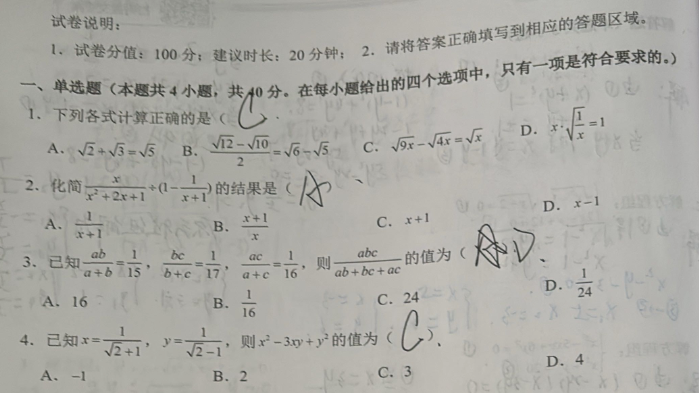
{
  "error_code": "0",
  "error_msg": "",
  "result": {
    "task_id": "1965376138007096888",
    "status": "Success",
    "created_time": 1757417161000,
    "started_time": 1757417162000,
    "finished_time": 1757497412914,
    "duration": 80250914,
    "result": {
      "qus_result_num": 4,
      "qus_result": [
        {
          "qus_id": 1,
          "location": {
            "qus_location": [
              { "x": 100, "y": 50, "w": 95, "h": 20 },
              { "x": 100, "y": 50, "w": 95, "h": 20 }
            ],
            "pic_location": [
              { "x": 100, "y": 50, "w": 95, "h": 20 }
            ],
            "ans_location": [
              { "x": 100, "y": 50, "w": 95, "h": 20 }
            ]
          }
        },
        {
          "qus_id": 2,
          "location": {
            "qus_location": [
              { "x": 100, "y": 50, "w": 95, "h": 20 },
              { "x": 100, "y": 50, "w": 95, "h": 20 }
            ],
            "pic_location": [
              { "x": 100, "y": 50, "w": 95, "h": 20 }
            ],
            "ans_location": [
              { "x": 100, "y": 50, "w": 95, "h": 20 }
            ]
          }
        },
        {
          "qus_id": 3,
          "location": {
            "qus_location": [
              { "x": 100, "y": 50, "w": 95, "h": 20 },
              { "x": 100, "y": 50, "w": 95, "h": 20 }
            ],
            "pic_location": [
              { "x": 100, "y": 50, "w": 95, "h": 20 }
            ],
            "ans_location": [
              { "x": 100, "y": 50, "w": 95, "h": 20 }
            ]
          }
        },
        {
          "qus_id": 4,
          "location": {
            "qus_location": [
              { "x": 100, "y": 50, "w": 95, "h": 20 },
              { "x": 100, "y": 50, "w": 95, "h": 20 }
            ],
            "pic_location": [
              { "x": 100, "y": 50, "w": 95, "h": 20 }
            ],
            "ans_location": [
              { "x": 100, "y": 50, "w": 95, "h": 20 }
            ]
          }
        }
      ]
    }
  }
}
示例二:试卷场景

{
  "error_code": "0",
  "error_msg": "",
  "result": {
    "task_id": "1965376138007096888",
    "status": "Success",
    "created_time": 1757417161000,
    "started_time": 1757417162000,
    "finished_time": 1757497412914,
    "duration": 80250914,
    "result": {
      "qus_result_num": 1,
      "qus_result": [
        {
          "qus_id": 1,
          "location": {
            "qus_location": [
              { "x": 100, "y": 50, "w": 95, "h": 20 },
              { "x": 100, "y": 50, "w": 95, "h": 20 }
            ],
            "pic_location": [
              { "x": 100, "y": 50, "w": 95, "h": 20 }
            ]
          },
          "qus_elements": {
            "question_words": "2.一袋奶粉重500克。每天用50克,用了7天,还剩多少克?",
            "choices": [],
            "qus_type": "问答题",
            "answer_words": [
              "150克"
            ]
          }
        }
      ]
    }
  }
}
示例三:答题卡场景
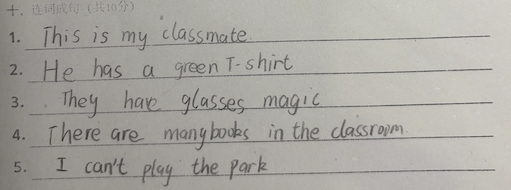
{
  "error_code": "0",
  "error_msg": "",
  "result": {
    "task_id": "1965376138007096888",
    "status": "Success",
    "created_time": 1757417161000,
    "started_time": 1757417162000,
    "finished_time": 1757497412914,
    "duration": 80250914,
    "result": {
      "log_id": 9876543210123124,
      "qus_result_num": 1,
      "qus_result": [
        {
          "que_id": 1,
          "location": {
            "qus_location": [
              {
                "x": 100,
                "y": 50,
                "w": 95,
                "h": 20
              }
            ],
            "pic_location": [
              {
                "x": 100,
                "y": 50,
                "w": 95,
                "h": 20
              }
            ]
          },
          "qus_elements": {
            "question_words": "",
            "choices": [],
            "qus_type": "",
            "answer_words": [
              {
                "number": "1.",
                "answer": "This is my classmate"
              },
              {
                "number": "2.",
                "answer": "He has a green T-shirt."
              },
              {
                "number": "3.",
                "answer": "They have glasses magic"
              },
              {
                "number": "4.",
                "answer": "There are many books in the classroom."
              },
              {
                "number": "5.",
                "answer": "I can't play the park."
              }
            ]
          }
        }
      ]
    }
  }
}失败返回示例(详细的错误码说明见API文档-错误码):
{
    "log_id": 1965712846932687146,
    "error_msg": "recognize error",
    "error_code": 216630
}