


PP-OCRv5_API_en
PP-OCRv5 Service Deployment & API Usage Example:
PaddleOCR open-source project GitHub address, this service is built based on the PP-OCRv5 model from this open-source project.
Version Information: The current version on the PaddleOCR official website corresponds to PaddleX version 3.3.12 and PaddlePaddle version 3.2.1.
1. Introduction to PP-OCRv5 Production Line
OCR (Optical Character Recognition) is a technology that converts text content in images into editable text. It is widely used in document digitization, information extraction, data processing, and other scenarios. OCR can recognize various types of text, including printed and handwritten characters, helping users efficiently obtain key information from images.
PP-OCRv5 is the latest generation text recognition solution in the PP-OCR series, designed for multi-scenario and multi-text-type recognition tasks. Compared to previous versions, PP-OCRv5 has achieved comprehensive upgrades in text type support and adaptability to various application scenarios. This solution can not only return the coordinates of text lines but also output the corresponding text content and its confidence score, effectively improving the accuracy and practicality of text detection and recognition. The features of this solution are as follows:
- Support for five major text types: Simplified Chinese, Chinese Pinyin, Traditional Chinese, English, and Japanese.
- Powerful multi-scenario adaptability: including complex Chinese-English handwritten text, vertical text, rare characters, and other challenging scenarios.
- On internal multi-scenario complex evaluation sets, PP-OCRv5 achieves a 13 percentage point improvement in end-to-end recognition accuracy compared to the previous generation, PP-OCRv4.
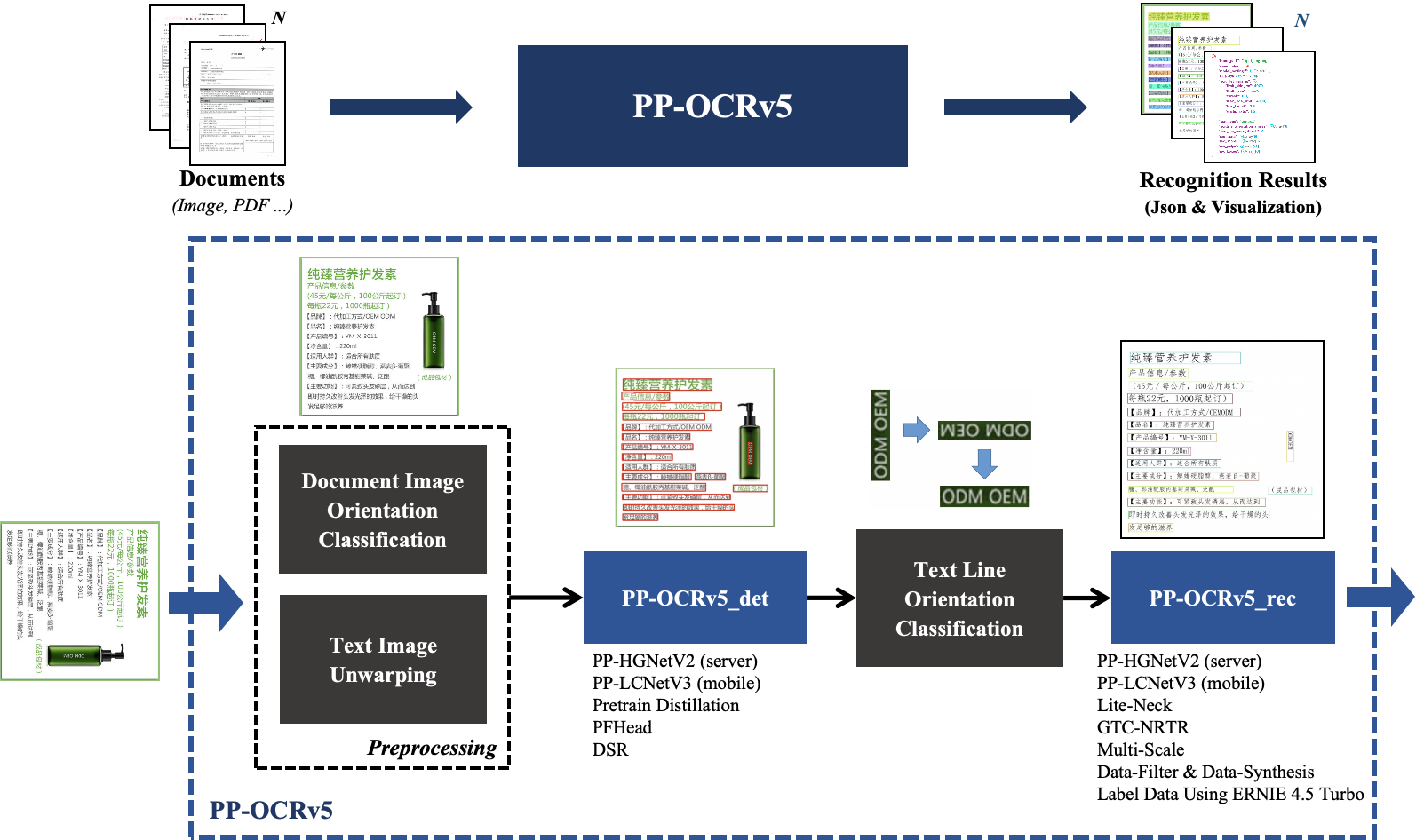
The overall workflow of the PP-OCRv5 production line is shown below:
2. API Quota Rules and Error Code Description
Please refer to the documentation.
3. Service Call Example (python)
# Please make sure the requests library is installed
# pip install requests
import os
import base64
import requests

# Please visit https://aistudio.baidu.com/paddleocr/task to obtain the API_URL and TOKEN in the API call example.
API_URL = "<your url>"
TOKEN = "<access token>"

file_path = "<local file path>"
input_filename = os.path.splitext(os.path.basename(file_path))[0]

with open(file_path, "rb") as file:
    file_bytes = file.read()
    file_data = base64.b64encode(file_bytes).decode("ascii")

headers = {
    "Authorization": f"token {TOKEN}",
    "Content-Type": "application/json"
}

required_payload = {
    "file": file_data,
    "fileType": <file type>,  # For PDF documents, set `fileType` to 0; for images, set `fileType` to 1
}

optional_payload = {
    "useDocOrientationClassify": False,
    "useDocUnwarping": False,
    "useTextlineOrientation": False,
}

payload = {**required_payload, **optional_payload}

response = requests.post(API_URL, json=payload, headers=headers)

assert response.status_code == 200
result = response.json()["result"]

os.makedirs("output", exist_ok=True)

for i, res in enumerate(result["ocrResults"]):
    print(res["prunedResult"])
    image_url = res["ocrImage"]
    img_response = requests.get(image_url)
    if img_response.status_code == 200:
        # Save image to local
        filename = f"output/{input_filename}_{i}.jpg"
        with open(filename, "wb") as f:
            f.write(img_response.content)
        print(f"Image saved to: {filename}")
    else:
        print(f"Failed to download image, status code: {img_response.status_code}")
Main operations provided by the service:
- The HTTP request method is POST.
- Both the request body and response body are JSON data (JSON objects).
- When the request is processed successfully, the response status code is
200. The response body has the following properties:
| Name | Type | Description |
|---|---|---|
logId |
string |
The UUID of the request. |
errorCode |
integer |
Error code. Fixed as0. |
errorMsg |
string |
Error description. Fixed as "Success". |
result |
object |
Operation result. |
- When the request fails, the response body has the following properties:
| Name | Type | Description |
|---|---|---|
logId |
string |
The UUID of the request. |
errorCode |
integer |
Error code. Same as the response status code. |
errorMsg |
string |
Error description. |
The main operation provided by the service is as follows:
infer
Obtain OCR results for images.
POST /ocr
4. Request Parameter Description
| Name | Parameter | Type | Description | Required |
|---|---|---|---|---|
Input File |
file |
string |
The URL of an image or PDF file accessible by the server, or the Base64-encoded content of such a file. By default, for PDF files with more than 10 pages, only the first 10 pages will be processed. To lift the page number limit, add the following configuration in the production config file: |
Yes |
File Type |
fileType |
integer | null |
File type. 0 stands for PDF files, 1 stands for image files. If this property is not present in the request body, the file type will be inferred from the URL. |
No |
Image Orientation Correction |
useDocOrientationClassify |
boolean | null |
Whether to use the document orientation classification module during inference. When enabled, the system can automatically identify and correct images rotated by 0°, 90°, 180°, or 270°,initialized to False by default. |
No |
Image Distortion Correction |
useDocUnwarping |
boolean | null |
Whether to use the text image correction module during inference. When enabled, it can automatically correct distorted images, such as wrinkled or skewed images,initialized to False by default. |
No |
Text Line Orientation Correction |
useTextlineOrientation |
boolean | null |
Whether to use the text line orientation classification module during inference. When enabled, the system can automatically identify and correct text lines at 0° and 180°,initialized to False by default. |
No |
Image Side Length Limit |
textDetLimitSideLen |
integer | null |
Image side length limit for text detection. Any integer greater than 0. If not set, the value initialized in the production config will be used, default is 64. |
No |
Image Side Length Limit Type |
textDetLimitType |
string | null |
Type of image side length limit for text detection. Supports min and max. min means to ensure the shortest side of the image is not less than textDetLimitSideLen, max means the longest side is not greater than textDetLimitSideLen. If not set, the value initialized in the production config will be used, default is min. |
No |
Text Detection Pixel Threshold |
textDetThresh |
number | null |
Text detection pixel threshold. Only pixels in the probability map with a score greater than this value will be considered as text pixels. Any float greater than 0. If not set, the value initialized in the production config will be used (default is 0.3). |
No |
Text Detection Box Threshold |
textDetBoxThresh |
number | null |
Text detection box threshold. For each detected box, if the average score of all pixels inside is greater than this value, the area is considered a text region. Any float greater than 0. If not set, the value initialized in the production config will be used (default is 0.6). |
No |
Expansion Coefficient |
textDetUnclipRatio |
number | null |
Text detection expansion ratio. This is used to expand text regions; the larger the value, the larger the expansion area. Any float greater than 0. If not set, the value initialized in the production config will be used (default is 1.5). |
No |
Text Recognition Score Threshold |
textRecScoreThresh |
number | null |
Text recognition score threshold. Only text results with a score greater than this value will be kept. Any float greater than 0. If not set, the value initialized in the production config will be used (default is 0.0, i.e., no threshold). |
No |
visualize |
visualize |
boolean | null |
Supports returning visualized result images and intermediate images generated during processing. Enabling this feature will increase the result response time.
For example, add the following field in the production config file: visualize parameter in the request body. If neither the request body nor the config file sets this parameter (or passes null and the config does not set it), images will be returned by default.
|
No |
- When the request is processed successfully, the
resultfield in the response body has the following properties:
| Name | Type | Description |
|---|---|---|
ocrResults |
object |
OCR results. The array length is 1 (for image input) or the actual number of pages processed (for PDF input). For PDF input, each element in the array corresponds to the result of each processed page in the PDF file. |
dataInfo |
object |
Input data information. |
Each element in ocrResults is an object with the following properties:
| Name | Type | Description |
|---|---|---|
prunedResult |
object |
A simplified version of the res field in the JSON result produced by the production object's predict method, with the input_path and page_index fields removed. |
ocrImage |
string | null |
The OCR result image, indicating detected text regions. Image is in JPEG format, Base64 encoded. |
docPreprocessingImage |
string | null |
Visualization result image. Image is in JPEG format, Base64 encoded. |
inputImage |
string | null |
Input image. Image is in JPEG format, Base64 encoded. |
For details on the returned data structure and field descriptions, please refer to the documentation.
Note: If you encounter any issues during use, please feel free to submit feedback in the issue section.
PP-OCRv6 Service Deployment & API Usage Example:
PaddleOCR open-source project GitHub address, this service is built based on the PP-OCRv6 model from this open-source project.
Version Information: The current version on the PaddleOCR official website corresponds to PaddleX version 3.7.0 and PaddlePaddle version 3.2.1.
1. PP-OCRv6 Introduction
PP-OCRv6 is the latest generation of the PP-OCR universal text recognition solution. Built on the newly designed PPLCNetV4 unified backbone, it offers tiny, small, and medium tiers targeting edge/IoT, mobile/desktop, and server scenarios respectively. PP-OCRv6 achieves a major breakthrough in language coverage—the medium/small tiers support 50 languages with a single unified model, including Simplified Chinese, Traditional Chinese, English, Japanese, and 46 Latin-script languages (tiny supports 49, excluding Japanese). On our in-house multi-scenario benchmark, PP-OCRv6_medium achieves +5.1% recognition accuracy and +4.6% detection Hmean over PP-OCRv5_server, with 2.37× GPU inference speedup; with only 34.5M parameters, it surpasses VLMs such as Qwen3-VL-235B and GPT-5.5 in accuracy.
Main contributions:
- Unified and Scalable Model Family: A three-tier OCR model family spanning 1.5M to 34.5M parameters. The medium tier achieves 86.2% detection Hmean and 83.2% recognition accuracy, serving as production-ready infrastructure for industrial deployment and large-scale data pipelines.
- Tailored Lightweight Architectural Innovations: (i) LCNetV4: a MetaFormer-style lightweight backbone with structural reparameterization; (ii) RepLKFPN: a detection neck with dilated reparameterizable depthwise convolutions for large receptive fields; (iii) EncoderWithLightSVTR: a recognition neck with local-global attention and additive skip connections.
- Extensive Multi-Language and Scenario Generalization: A single model scaled to support 50 languages and diverse challenging industrial scenes (e.g., digital displays, dot-matrix characters, tire prints), significantly improving OCR performance in scenarios traditionally underserved by general-purpose VLMs.

Performance comparison between PP-OCRv6, PP-OCRv5, and Vision-Language Models. Left: text detection average Hmean (%); Right: text recognition weighted average accuracy (%).