


PaddleOCR-VL_API_en
PaddleOCR-VL Service Deployment & API Usage Example:
PaddleOCR open-source project GitHub address, this service is built based on the PaddleOCR-VL model from this open-source project.
Version Information: The current version on the PaddleOCR official website corresponds to PaddleX version 3.3.12 and PaddlePaddle version 3.2.1.
1. Introduction to PaddleOCR-VL
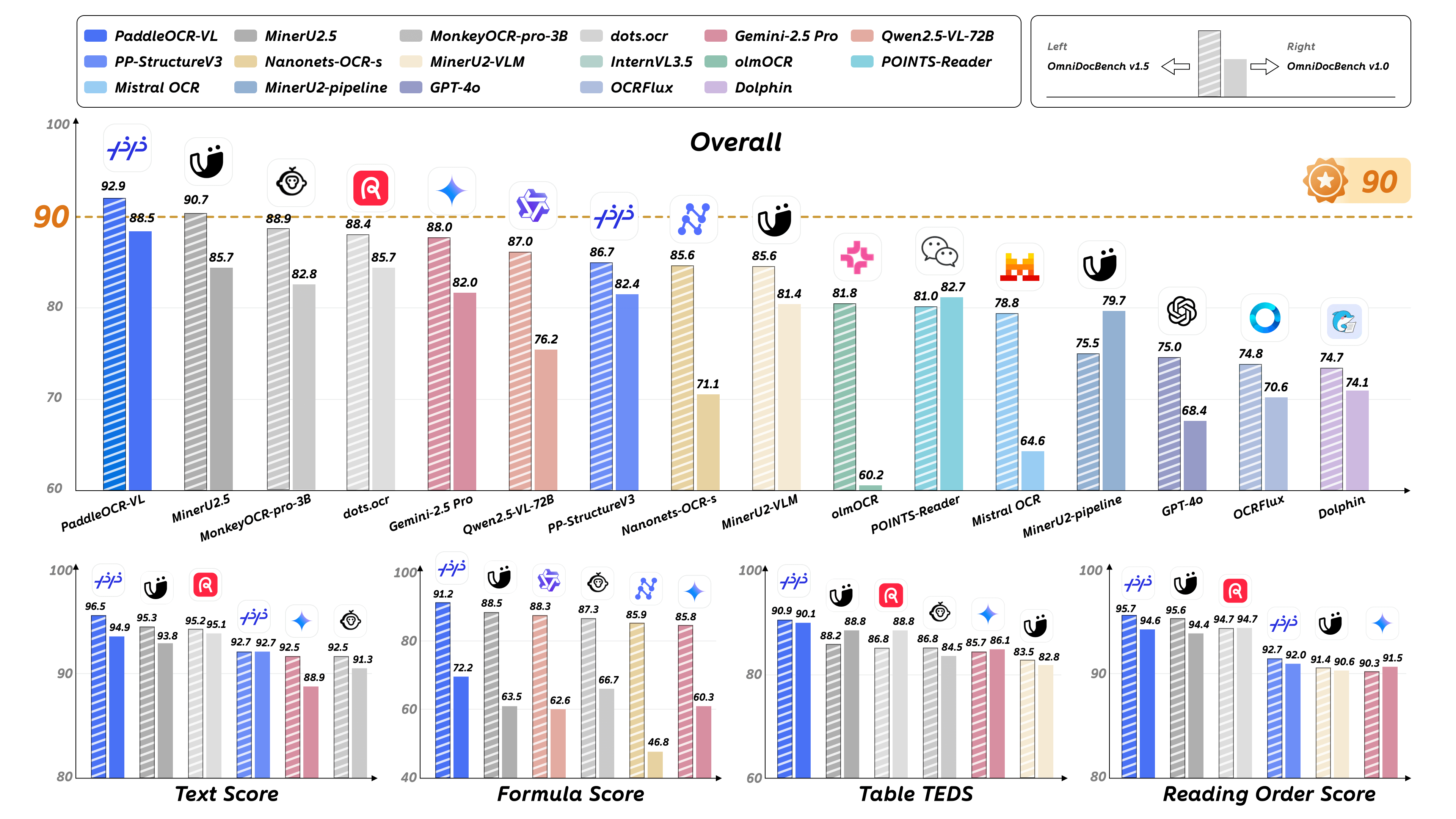
PaddleOCR-VL is an advanced and efficient document analysis model designed for element recognition within documents. Its core component, PaddleOCR-VL-0.9B, is a compact yet powerful Vision-Language Model (VLM) composed of a NaViT-style dynamic resolution visual encoder and an ERNIE-4.5-0.3B language model, enabling precise element recognition. The model supports 109 languages and excels at identifying complex elements such as text, tables, formulas, and charts, all while maintaining extremely low resource consumption. Comprehensive evaluations on widely-used public benchmarks and internal datasets demonstrate that PaddleOCR-VL achieves state-of-the-art (SOTA) performance in both page-level document analysis and element-level recognition. It significantly outperforms existing pipeline-based solutions, other multimodal document analysis approaches, and advanced general-purpose multimodal large models, while offering faster inference speed. These advantages make it highly suitable for real-world deployment.
Key Metrics:
Core Features:
- Compact and Powerful Vision-Language Model Architecture:
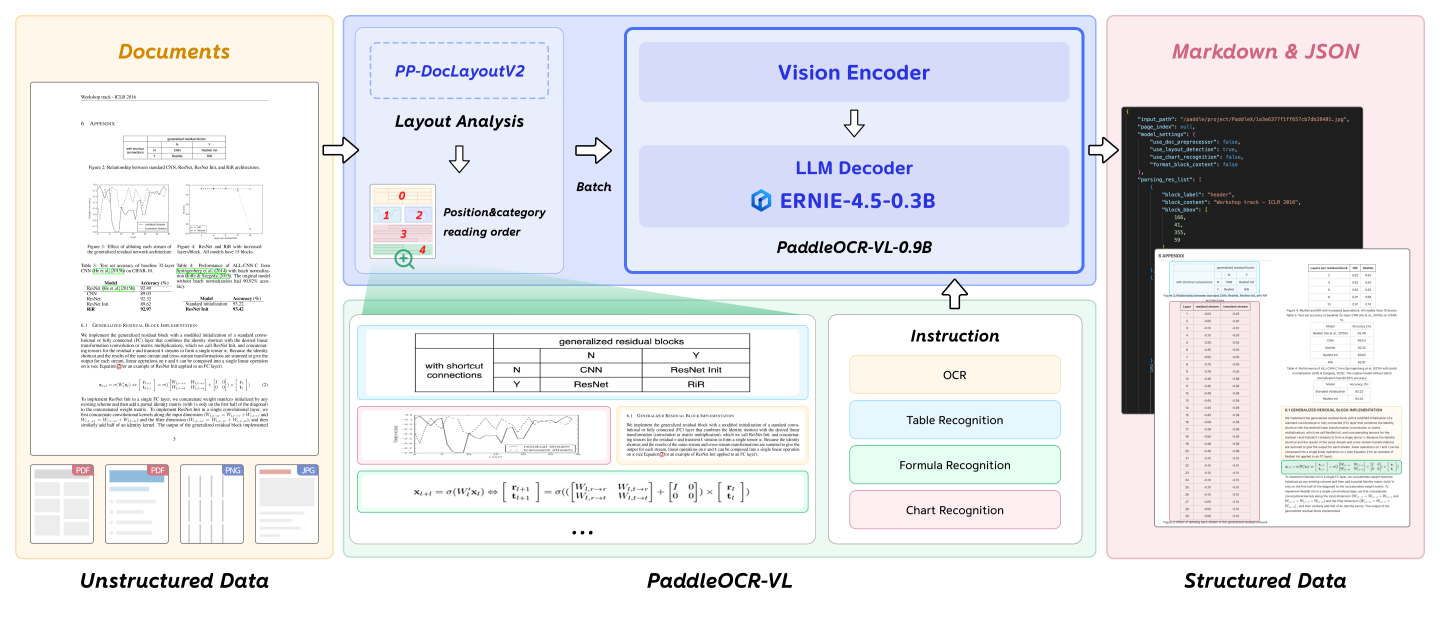
We propose a novel vision-language model specifically designed for resource-efficient inference and outstanding element recognition. By integrating a NaViT-style dynamic high-resolution visual encoder with a lightweight ERNIE-4.5-0.3B language model, we significantly enhance recognition capability and decoding efficiency. This integration maintains high accuracy while reducing computational requirements, making it ideal for efficient and practical document processing applications. - SOTA Performance in Document Analysis:
PaddleOCR-VL achieves state-of-the-art performance in both page-level document parsing and element-level recognition. It significantly outperforms traditional pipeline-based solutions and demonstrates competitive strength against leading vision-language models (VLMs) in document analysis. Furthermore, it excels at identifying complex document elements such as text, tables, formulas, and charts, making it suitable for challenging content types including handwritten text and historical documents. This versatility enables it to handle a wide range of document types and scenarios. - Multilingual Support:
PaddleOCR-VL supports 109 languages, covering the major global languages such as Chinese, English, Japanese, Latin, and Korean, as well as languages with diverse scripts and structures like Russian (Cyrillic), Arabic, Hindi (Devanagari), and Thai. This extensive language coverage greatly enhances the system's applicability in multilingual and global document processing scenarios.
The following diagram illustrates the overall workflow of PaddleOCR-VL:
2. API Quota Rules and Error Code Description
Please refer to the documentation.
3. Service Call Example (python)
# Please make sure the requests library is installed
# pip install requests
import base64
import os
import requests

# Please visit https://aistudio.baidu.com/paddleocr/task to obtain the API_URL and TOKEN in the API call example.
API_URL = "<your url>"
TOKEN = "<access token>"

file_path = "<local file path>"

with open(file_path, "rb") as file:
    file_bytes = file.read()
    file_data = base64.b64encode(file_bytes).decode("ascii")

headers = {
    "Authorization": f"token {TOKEN}",
    "Content-Type": "application/json"
}

required_payload = {
    "file": file_data,
    "fileType": <file type>,  # For PDF documents, set `fileType` to 0; for images, set `fileType` to 1
}

optional_payload = {
    "useDocOrientationClassify": False,
    "useDocUnwarping": False,
    "useChartRecognition": False,
}

payload = {**required_payload, **optional_payload}


response = requests.post(API_URL, json=payload, headers=headers)
print(response.status_code)
assert response.status_code == 200
result = response.json()["result"]

output_dir = "output"
os.makedirs(output_dir, exist_ok=True)

for i, res in enumerate(result["layoutParsingResults"]):
    md_filename = os.path.join(output_dir, f"doc_{i}.md")
    with open(md_filename, "w", encoding="utf-8") as md_file:
        md_file.write(res["markdown"]["text"])
    print(f"Markdown document saved at {md_filename}")
    for img_path, img in res["markdown"]["images"].items():
        full_img_path = os.path.join(output_dir, img_path)
        os.makedirs(os.path.dirname(full_img_path), exist_ok=True)
        img_bytes = requests.get(img).content
        with open(full_img_path, "wb") as img_file:
            img_file.write(img_bytes)
        print(f"Image saved to: {full_img_path}")
    for img_name, img in res["outputImages"].items():
        img_response = requests.get(img)
        if img_response.status_code == 200:
            # Save image to local
            filename = os.path.join(output_dir, f"{img_name}_{i}.jpg")
            with open(filename, "wb") as f:
                f.write(img_response.content)
            print(f"Image saved to: {filename}")
        else:
            print(f"Failed to download image, status code: {img_response.status_code}")
Main operations provided by the service:
- The HTTP request method is POST.
- Both the request body and response body are in JSON format (JSON object).
- When the request is processed successfully, the response status code is
200, and the response body contains the following properties:
| Name | Type | Description |
|---|---|---|
logId |
string |
The UUID of the request. |
errorCode |
integer |
Error code. Always 0. |
errorMsg |
string |
Error description. Always "Success". |
result |
object |
Operation result. |
- When the request is not processed successfully, the response body contains the following properties:
| Name | Type | Description |
|---|---|---|
logId |
string |
The UUID of the request. |
errorCode |
integer |
Error code. Same as the response status code. |
errorMsg |
string |
Error description. |
Main operations provided by the service are as follows:
infer
Performs document analysis.
POST /layout-parsing
4. Request Parameter Description
| Name | Parameter | Type | Description | Required |
|---|---|---|---|---|
Input File |
file |
string |
URL of an image or PDF file accessible by the server, or the Base64-encoded content of the above file types. By default, for PDF files with more than 10 pages, only the first 10 pages will be processed. To remove the page limit, add the following configuration in the pipeline config file: |
Yes |
File Type |
fileType |
integer|null |
File type. 0 stands for PDF files, 1 stands for image files. If this property is not present in the request body, the file type will be inferred from the URL. |
No |
Image Orientation Correction |
useDocOrientationClassify |
boolean | null |
Whether to use the document image orientation correction module during inference. When enabled, the system can automatically identify and correct images rotated by 0°, 90°, 180°, or 270°, initialized to False by default. |
No |
Image Distortion Correction |
useDocUnwarping |
boolean | null |
Whether to use the document image unwarping module during inference. When enabled, it can automatically correct distorted images, such as wrinkled or skewed images, initialized to False by default. |
No |
Layout Analysis |
useLayoutDetection |
boolean | null |
Whether to use the layout detection and sorting module during inference. When enabled, it can automatically detect and sort different regions in the document. | No |
Chart Recognition |
useChartRecognition |
boolean | null |
Whether to use the chart recognition module during inference. When enabled, it can automatically parse charts (such as bar charts, pie charts, etc.) in the document and convert them into tables for easier viewing and editing, initialized to False by default. |
No |
Layout Region Filtering Strength |
layoutThreshold |
number | object | null |
Layout model score threshold. Any float between 0-1. If not set, the pipeline initialization value will be used (default is 0.5). |
No |
NMS Post-processing |
layoutNms |
boolean | null |
Whether to use post-processing NMS (Non-Maximum Suppression) during layout detection. When enabled, it will automatically remove duplicate or highly overlapping bounding boxes. | No |
Expansion Coefficient |
layoutUnclipRatio |
number | array | object | null |
Expansion coefficient for layout region detection bounding boxes. Any float greater than 0. If not set, the pipeline initialization value will be used (default is 1.0). |
No |
Overlapping Box Filtering Methods |
layoutMergeBboxesMode |
string | object | null |
large).
|
No |
Prompt Type Setting |
promptLabel |
string | null |
Prompt type setting for the VL model. This is effective only when useLayoutDetection=False. |
No |
Repetition Suppression Strength |
repetitionPenalty |
number | null |
If the result contains repeated text or table content, you can increase this value appropriately. | No |
Recognition Stability |
temperature |
number | null |
If the results are unstable or hallucinations occur, decrease this value. If there are missed recognitions or many repetitions, you can slightly increase it. | No |
Result Reliability Range |
topP |
number | null |
If results are too divergent or unreliable, decrease this value to make the model more conservative. | No |
Minimum Image Size |
minPixels |
number | null |
If the input image is too small or text is unclear, you can increase this value appropriately. Usually, no need to adjust. | No |
Maximum Image Size |
maxPixels |
number | null |
If the input image is very large, processing slows down or GPU memory pressure is high, you can decrease this value appropriately. | No |
Formula Number Display |
showFormulaNumber |
boolean |
Whether the output Markdown text includes formula numbers. | No |
Markdown Prettify |
prettifyMarkdown |
boolean |
Whether to output beautified Markdown text. | No |
visualize |
visualize |
boolean | null |
Supports returning visualized result images and intermediate images generated during processing. Enabling this feature will increase the result response time.
For example, add the following field in the pipeline config file: visualize parameter in the request body can override this default behavior. If neither the request body nor the config file sets this parameter (or if it is null in the request body and not set in the config file), images will be returned by default.
|
No |
- When the request is processed successfully, the
resultfield in the response body has the following properties:
| Name | Type | Description |
|---|---|---|
layoutParsingResults |
array |
Document parsing results. The array length is 1 (for image input) or the number of processed document pages (for PDF input). For PDF input, each element represents the result of each processed page in the PDF file. |
dataInfo |
object |
Input data information. |
Each element in layoutParsingResults is an object with the following properties:
| Name | Type | Description |
|---|---|---|
prunedResult |
object |
Simplified version of the res field from the pipeline object's predict method in JSON format, with input_path and page_index fields removed. |
markdown |
object |
Markdown result. |
outputImages |
object | null |
See the img property in the pipeline prediction result for details. Images are in JPEG format and Base64-encoded. |
inputImage |
string | null |
Input image. JPEG format, Base64-encoded. |
markdown is an object with the following properties:
| Name | Type | Description |
|---|---|---|
text |
string |
Markdown text. |
images |
object |
Key-value pairs of Markdown image relative paths and Base64-encoded images. |
isStart |
boolean |
Whether the first element of the current page is the start of a paragraph. |
isEnd |
boolean |
Whether the last element of the current page is the end of a paragraph. |
For details on the returned data structure and field descriptions, please refer to the documentation.
Note: If you encounter any issues during use, please feel free to submit feedback in the issue section.