


PP-StructureV3_API_en
PP-StructureV3 Service Deployment & API Usage Example:
PaddleOCR open-source project GitHub address, this service is built based on the PP-StructureV3 model from this open-source project.
Version Information: The current version on the PaddleOCR official website corresponds to PaddleX version 3.3.12 and PaddlePaddle version 3.2.1.
1. Introduction to the PP-StructureV3 Pipeline
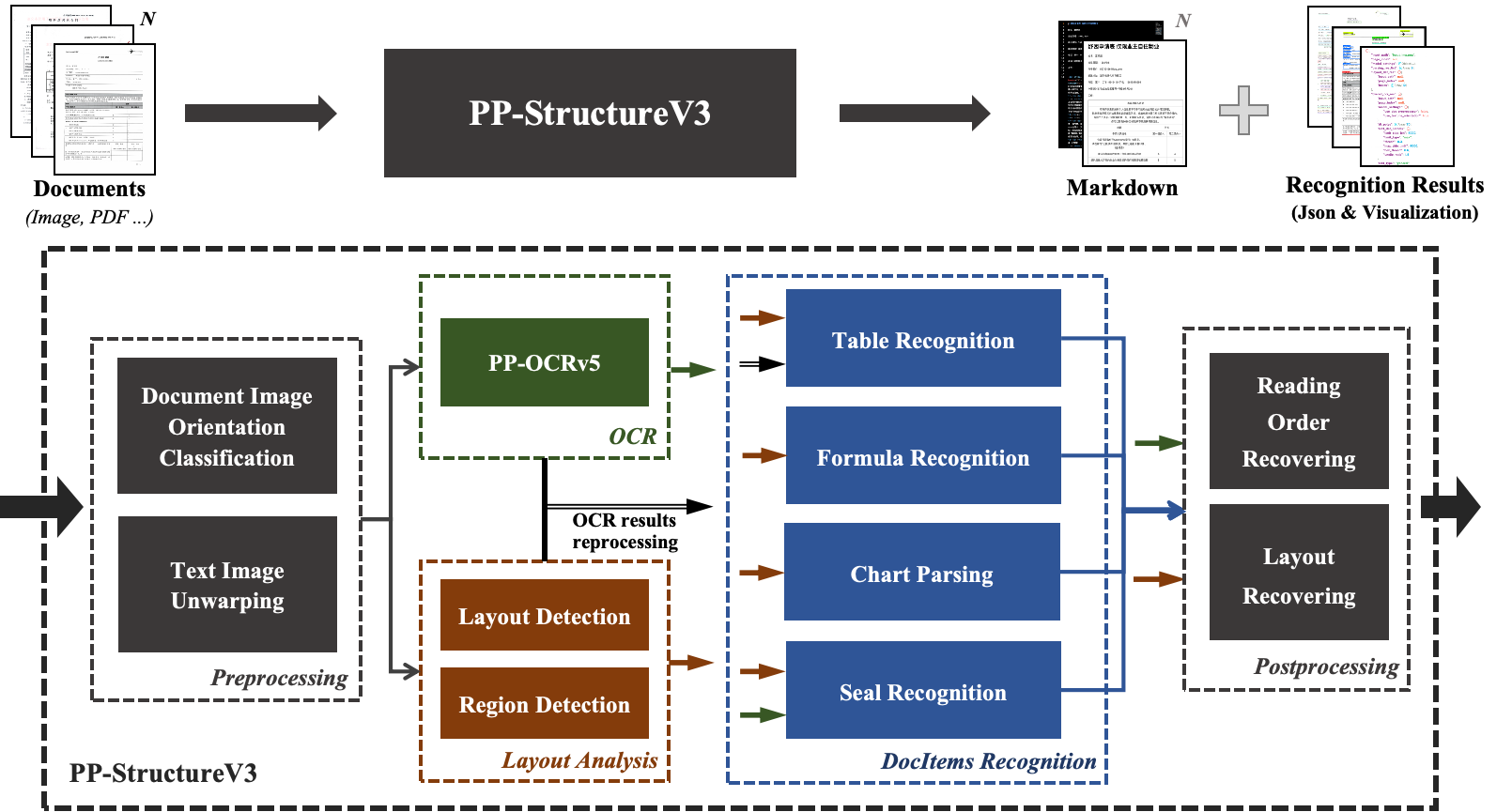
PP-StructureV3 is an efficient and comprehensive document analysis solution capable of extracting structured information from various types of document images and PDF files. By integrating advanced technologies such as Optical Character Recognition (OCR), image processing, and deep learning, PP-StructureV3 can identify and extract elements like text blocks, headings, paragraphs, images, tables, formulas, and charts from documents. It transforms complex document contents into machine-readable data formats (such as Markdown and JSON), greatly improving the efficiency and accuracy of document data processing.
The PP-StructureV3 pipeline mainly consists of the following modules:
- Preprocessing Module: Includes document image orientation classification and text image correction, providing high-quality input for subsequent processing.
- Layout Region Detection Module: Precisely locates and differentiates various functional regions in the document through layout region detection.
- OCR Recognition Module: Utilizes the PP-OCRv5 model to efficiently recognize text content in detected text regions.
- Document Element Recognition Module (Optional): Supports table recognition, formula recognition, chart parsing, and stamp recognition, enabling extraction of rich structured semantic information from various complex documents.
- Reading Order Module: Restores the reading order and layout structure of multi-column documents, making the results more consistent with the logical structure of the original document.
PP-StructureV3 performs excellently across various document types, especially when processing documents with complex structures and multi-column layouts. The following diagram shows the overall workflow of the PP-StructureV3 document analysis pipeline:
2. API Quota Rules and Error Code Description
Please refer to the documentation.
3. Service Call Example (python)
# Please make sure the requests library is installed
# pip install requests
import base64
import os
import requests

# Please visit https://aistudio.baidu.com/paddleocr/task to obtain the API_URL and TOKEN in the API call example.
API_URL = "<your url>"
TOKEN = "<access token>"

file_path = "<local file path>"

with open(file_path, "rb") as file:
    file_bytes = file.read()
    file_data = base64.b64encode(file_bytes).decode("ascii")

headers = {
    "Authorization": f"token {TOKEN}",
    "Content-Type": "application/json"
}

required_payload = {
    "file": file_data,
    "fileType": <file type>,  # For PDF documents, set `fileType` to 0; for images, set `fileType` to 1
}

optional_payload = {
    "useDocOrientationClassify": False,
    "useDocUnwarping": False,
    "useTextlineOrientation": False,
    "useChartRecognition": False,
}

payload = {**required_payload, **optional_payload}


response = requests.post(API_URL, json=payload, headers=headers)
print(response.status_code)
assert response.status_code == 200
result = response.json()["result"]

output_dir = "output"
os.makedirs(output_dir, exist_ok=True)

for i, res in enumerate(result["layoutParsingResults"]):
    md_filename = os.path.join(output_dir, f"doc_{i}.md")
    with open(md_filename, "w", encoding="utf-8") as md_file:
        md_file.write(res["markdown"]["text"])
    print(f"Markdown document saved at {md_filename}")
    for img_path, img in res["markdown"]["images"].items():
        full_img_path = os.path.join(output_dir, img_path)
        os.makedirs(os.path.dirname(full_img_path), exist_ok=True)
        img_bytes = requests.get(img).content
        with open(full_img_path, "wb") as img_file:
            img_file.write(img_bytes)
        print(f"Image saved to: {full_img_path}")
    for img_name, img in res["outputImages"].items():
        img_response = requests.get(img)
        if img_response.status_code == 200:
            # Save image to local
            filename = os.path.join(output_dir, f"{img_name}_{i}.jpg")
            with open(filename, "wb") as f:
                f.write(img_response.content)
            print(f"Image saved to: {filename}")
        else:
            print(f"Failed to download image, status code: {img_response.status_code}")
Main operations provided by the service:
- The HTTP request method is POST.
- Both the request body and response body are in JSON format (JSON object).
- When the request is processed successfully, the response status code is
200, and the response body contains the following properties:
| Name | Type | Description |
|---|---|---|
logId |
string |
The UUID of the request. |
errorCode |
integer |
Error code. Always 0. |
errorMsg |
string |
Error description. Always "Success". |
result |
object |
Operation result. |
- When the request is not processed successfully, the response body contains the following properties:
| Name | Type | Description |
|---|---|---|
logId |
string |
The UUID of the request. |
errorCode |
integer |
Error code. Same as the response status code. |
errorMsg |
string |
Error description. |
Main operations provided by the service are as follows:
infer
Performs document analysis.
POST /layout-parsing
4. Request Parameter Description
| Name | Parameter | Type | Description | Required |
|---|---|---|---|---|
Input File |
file |
string |
URL of an image or PDF file accessible by the server, or the Base64-encoded content of the above file types. By default, for PDF files with more than 10 pages, only the first 10 pages will be processed. To remove the page limit, add the following configuration in the pipeline config file: |
Yes |
File Type |
fileType |
integer|null |
File type. 0 for PDF files, 1 for image files. If this property is not provided, the file type will be inferred from the URL. |
No |
Image Orientation Correction |
useDocOrientationClassify |
boolean | null |
Whether to use the document orientation classification module during inference. If enabled, images with 0°, 90°, 180°, and 270° rotation can be automatically detected and corrected,initialized to False by default. |
No |
Image Distortion Correction |
useDocUnwarping |
boolean | null |
Whether to use the text image unwarping module during inference. If enabled, distorted images, such as wrinkled or skewed ones, can be automatically corrected,initialized to False by default. |
No |
Text Line Orientation Correction |
useTextlineOrientation |
boolean | null |
Whether to use the textline orientation classification module during inference. If enabled, 0° and 180° text lines can be automatically detected and corrected,initialized to False by default. |
No |
Seal Recognition |
useSealRecognition |
boolean | null |
Whether to use the seal text recognition sub-pipeline during inference. If enabled, the content of seals in documents can be recognized,initialized to False by default. |
No |
Table Recognition |
useTableRecognition |
boolean | null |
Whether to use the table recognition sub-pipeline during inference. If enabled, tables in documents can be converted to structured formats like HTML or Markdown; if not enabled, tables will be retained as images,initialized to True by default. |
No |
Formula Recognition |
useFormulaRecognition |
boolean | null |
Whether to use the formula recognition sub-pipeline during inference. If enabled, mathematical formulas can be converted to LaTeX code; if not enabled, formulas will be recognized as normal text,initialized to True by default. |
No |
Chart to Table |
useChartRecognition |
boolean | null |
Whether to use the chart parsing module during inference. If enabled, charts (such as bar and pie charts) in documents can be automatically parsed and converted to table format for easier viewing and editing,initialized to False by default. |
No |
Complex Layout Handling |
useRegionDetection |
boolean | null |
Whether to use the document region detection module during inference. If enabled, the module can better recognize complicated layouts such as newspapers and magazines, improving accuracy,initialized to True by default. |
No |
Layout Region Filtering Strength |
layoutThreshold |
number | object | null |
Layout model score threshold. Any float between 0-1. If not set, the pipeline initialization value will be used (default is 0.5). |
No |
NMS Postprocessing |
layoutNms |
boolean | null |
If enabled, duplicate or highly overlapping bounding boxes will be automatically removed. | No |
Expansion Coefficient |
layoutUnclipRatio |
number | array | object | null |
Expansion coefficient for layout region detection bounding boxes. Any float greater than 0. If not set, the pipeline initialization value will be used (default is 1.0). |
No |
Overlapping Box Filtering Methods |
layoutMergeBboxesMode |
string | object | null |
large).
|
No |
Image Side Length Limit |
textDetLimitSideLen |
integer | null |
Image side length limit for text detection. Any integer greater than 0. If not set, the pipeline initialization value will be used (default is 64). |
No |
Image Side Length Limit Type |
textDetLimitType |
string | null |
Text detection side length limit type. Supports min and max: min ensures the shortest side is not less than textDetLimitSideLen, max ensures the longest side is not greater than textDetLimitSideLen. If not set, the pipeline initialization value will be used (default is min). |
No |
Text Detection Pixel Threshold |
textDetThresh |
number | null |
Text detection pixel threshold. Only pixels in the probability map with scores greater than this threshold will be considered as text pixels. Any float greater than 0. If not set, the pipeline initialization value will be used (default is 0.3). |
No |
Text Detection Box Threshold |
textDetBoxThresh |
number | null |
Text detection box threshold. If the average score of all pixels within a detected bounding box is greater than this threshold, it will be considered as a text region. Any float greater than 0. If not set, the pipeline initialization value will be used (default is 0.6). |
No |
Expansion Coefficient |
textDetUnclipRatio |
number | null |
Text detection expansion coefficient. The larger the value, the more the text region will be expanded. Any float greater than 0. If not set, the pipeline initialization value will be used (default is 1.5). |
No |
Text Recognition Score Threshold |
textRecScoreThresh |
number | null |
Text recognition threshold. Only text results with scores greater than this value will be kept. Any float greater than 0. If not set, the pipeline initialization value will be used (default is 0.0, i.e., no threshold). |
No |
Seal Image Side Length Limit |
sealDetLimitSideLen |
integer | null |
Image side length limit for seal text detection. Any integer greater than 0. If not set, the pipeline initialization value will be used (default is 736). |
No |
Seal Image Side Length Limit Type |
sealDetLimitType |
string | null |
Image side length limit type for seal text detection. Supports min and max. min ensures the shortest side is not less than sealDetLimitSideLen, max ensures the longest side is not greater than sealDetLimitSideLen. If not set, the pipeline initialization value will be used (default is min). |
No |
Seal Text Detection Pixel Threshold |
sealDetThresh |
number | null |
Seal detection pixel threshold. Only pixels in the probability map with scores greater than this threshold will be considered as text pixels. Any float greater than 0. If not set, the pipeline initialization value will be used (default is 0.2). |
No |
Seal Text Detection Box Threshold |
sealDetBoxThresh |
number | null |
Seal detection box threshold. If the average score of all pixels within a detected bounding box is greater than this threshold, it will be considered as a text region. Any float greater than 0. If not set, the pipeline initialization value will be used (default is 0.6). |
No |
Expansion Coefficient |
sealDetUnclipRatio |
number | null |
Seal text detection expansion coefficient. The larger the value, the more the text region will be expanded. Any float greater than 0. If not set, the pipeline initialization value will be used (default is 0.5). |
No |
Seal Text Recognition Score Threshold |
sealRecScoreThresh |
number | null |
Seal text recognition threshold. Only text results with scores greater than this value will be kept. Any float greater than 0. If not set, the pipeline initialization value will be used (default is 0.0, i.e., no threshold). |
No |
Wired Table to HTML |
useWiredTableCellsTransToHtml |
boolean |
Whether to enable direct HTML conversion of detected wired table cells. If enabled, HTML is directly constructed based on the geometric relation of detected wired table cells. | No |
Wireless Table to HTML |
useWirelessTableCellsTransToHtml |
boolean |
Whether to enable direct HTML conversion of detected wireless table cells. If enabled, HTML is directly constructed based on the geometric relation of detected wireless table cells. | No |
Table Orientation Correction |
useTableOrientationClassify |
boolean |
Whether to enable table orientation classification. If enabled, rotated tables (90°, 180°, 270°) in images can be corrected and recognized properly. | No |
Table Cell-by-Cell Recognition Mode |
useOcrResultsWithTableCells |
boolean |
Whether to enable cell-based OCR splitting. If enabled, OCR detection results will be split and re-recognized based on cell prediction results, avoiding text loss. | No |
End-to-End Wired Table Prediction |
useE2eWiredTableRecModel |
boolean |
Whether to enable end-to-end wired table recognition mode. If enabled, only the table structure recognition model is used, without using the cell detection model. | No |
End-to-End Wireless Table Prediction |
useE2eWirelessTableRecModel |
boolean |
Whether to enable end-to-end wireless table recognition mode. If enabled, only the table structure recognition model is used, without using the cell detection model. | No |
visualize |
visualize |
boolean | null |
Supports returning visualized result images and intermediate images generated during processing. Enabling this feature will increase the result response time.
For example, add the following field in the pipeline config file: visualize parameter in the request body can override this default behavior. If neither the request body nor the config file sets this parameter (or if it is null in the request body and not set in the config file), images will be returned by default.
|
No |
- When the request is processed successfully, the
resultfield in the response body has the following properties:
| Name | Type | Description |
|---|---|---|
layoutParsingResults |
array |
Document parsing results. The array length is 1 (for image input) or the number of processed document pages (for PDF input). For PDF input, each element represents the result of each processed page in the PDF file. |
dataInfo |
object |
Input data information. |
Each element in layoutParsingResults is an object with the following properties:
| Name | Type | Description |
|---|---|---|
prunedResult |
object |
Simplified version of the res field from the pipeline object's predict method in JSON format, with input_path and page_index fields removed. |
markdown |
object |
Markdown result. |
outputImages |
object | null |
See the img property in the pipeline prediction result for details. Images are in JPEG format and Base64-encoded. |
inputImage |
string | null |
Input image. JPEG format, Base64-encoded. |
markdown is an object with the following properties:
| Name | Type | Description |
|---|---|---|
text |
string |
Markdown text. |
images |
object |
Key-value pairs of Markdown image relative paths and Base64-encoded images. |
isStart |
boolean |
Whether the first element of the current page is the start of a paragraph. |
isEnd |
boolean |
Whether the last element of the current page is the end of a paragraph. |
For details on the returned data structure and field descriptions, please refer to the documentation.
Note: If you encounter any issues during use, please feel free to submit feedback in the issue section.