


PaddleOCR-VL-1.5_API_en
PaddleOCR-VL Service Deployment & API Usage Example:
PaddleOCR open-source project GitHub address, this service is built based on the PaddleOCR-VL model from this open-source project.
Version Information: The current version on the PaddleOCR official website corresponds to PaddleX version 3.4.0 and PaddlePaddle version 3.2.1.
1. Introduction to PaddleOCR-VL
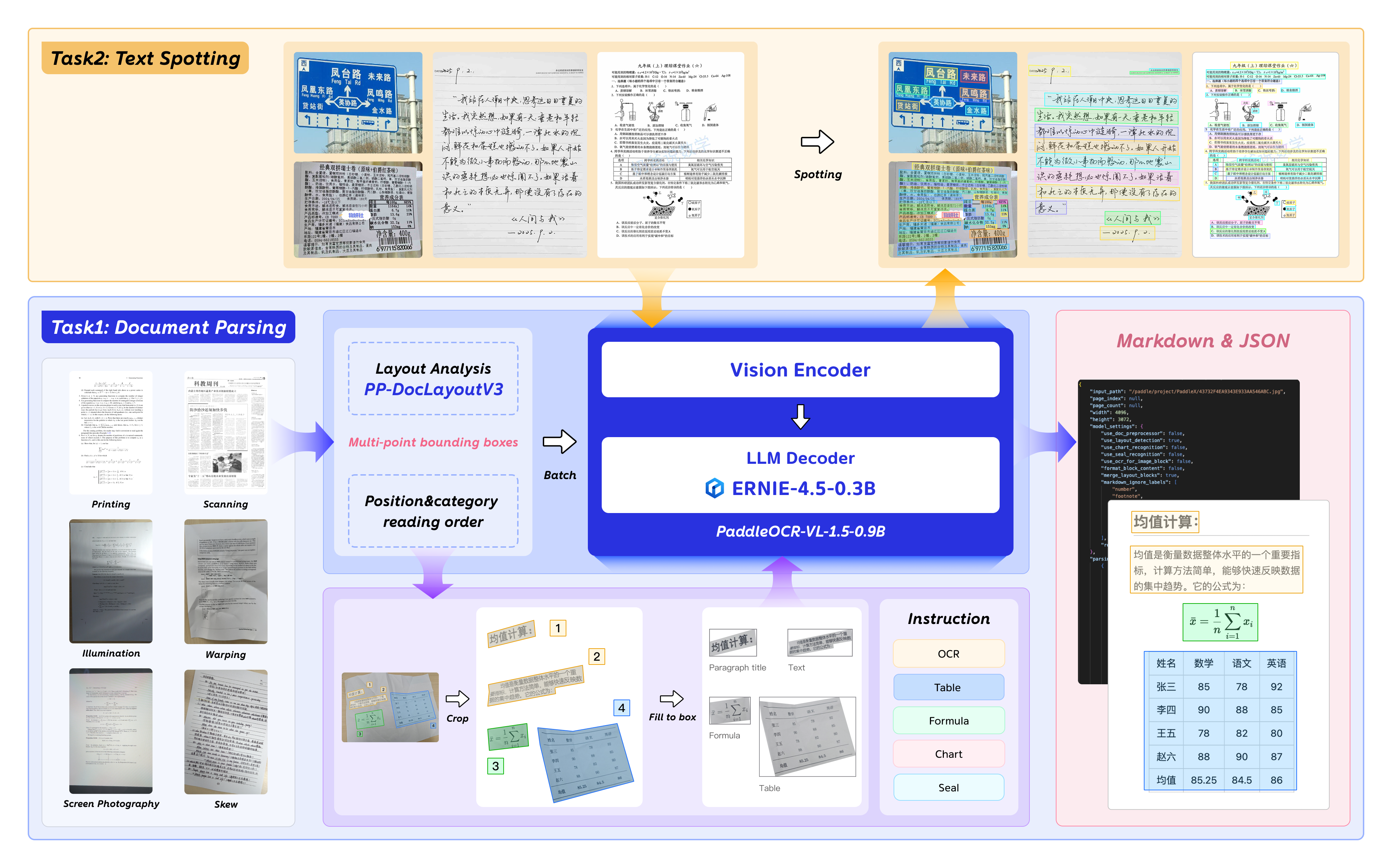
On January 29, 2026, we released PaddleOCR-VL-1.5. PaddleOCR-VL-1.5 not only significantly improved the accuracy on the OmniDocBench v1.5 evaluation set to 94.5%, but also innovatively supports irregular-shaped bounding box localization. As a result, PaddleOCR-VL-1.5 demonstrates outstanding performance in real-world scenarios such as Skew, Warping, Screen Photography, Illumination, and Scanning. In addition, the model has added new capabilities for seal (stamp) recognition and text detection and recognition, with key metrics continuing to lead the industry.
Key Metrics:

The following diagram illustrates the overall workflow of PaddleOCR-VL-1.5 and its newly added capabilities:
2. API Quota Rules and Error Code Description
Please refer to the documentation.
3. Service Call Example (python)
# Please make sure the requests library is installed
# pip install requests
import base64
import os
import requests

# Please visit https://aistudio.baidu.com/paddleocr/task to obtain the API_URL and TOKEN in the API call example.
API_URL = "<your url>"
TOKEN = "<access token>"

file_path = "<local file path>"

with open(file_path, "rb") as file:
    file_bytes = file.read()
    file_data = base64.b64encode(file_bytes).decode("ascii")

headers = {
    "Authorization": f"token {TOKEN}",
    "Content-Type": "application/json"
}

required_payload = {
    "file": file_data,
    "fileType": <file type>,  # For PDF documents, set `fileType` to 0; for images, set `fileType` to 1
}

optional_payload = {
    "useDocOrientationClassify": False,
    "useDocUnwarping": False,
    "useChartRecognition": False,
}

payload = {**required_payload, **optional_payload}


response = requests.post(API_URL, json=payload, headers=headers)
print(response.status_code)
assert response.status_code == 200
result = response.json()["result"]

output_dir = "output"
os.makedirs(output_dir, exist_ok=True)

for i, res in enumerate(result["layoutParsingResults"]):
    md_filename = os.path.join(output_dir, f"doc_{i}.md")
    with open(md_filename, "w", encoding="utf-8") as md_file:
        md_file.write(res["markdown"]["text"])
    print(f"Markdown document saved at {md_filename}")
    for img_path, img in res["markdown"]["images"].items():
        full_img_path = os.path.join(output_dir, img_path)
        os.makedirs(os.path.dirname(full_img_path), exist_ok=True)
        img_bytes = requests.get(img).content
        with open(full_img_path, "wb") as img_file:
            img_file.write(img_bytes)
        print(f"Image saved to: {full_img_path}")
    for img_name, img in res["outputImages"].items():
        img_response = requests.get(img)
        if img_response.status_code == 200:
            # Save image to local
            filename = os.path.join(output_dir, f"{img_name}_{i}.jpg")
            with open(filename, "wb") as f:
                f.write(img_response.content)
            print(f"Image saved to: {filename}")
        else:
            print(f"Failed to download image, status code: {img_response.status_code}")
Main operations provided by the service:
- The HTTP request method is POST.
- Both the request body and response body are in JSON format (JSON object).
- When the request is processed successfully, the response status code is
200, and the response body contains the following properties:
| Name | Type | Description |
|---|---|---|
logId |
string |
The UUID of the request. |
errorCode |
integer |
Error code. Always 0. |
errorMsg |
string |
Error description. Always "Success". |
result |
object |
Operation result. |
- When the request is not processed successfully, the response body contains the following properties:
| Name | Type | Description |
|---|---|---|
logId |
string |
The UUID of the request. |
errorCode |
integer |
Error code. Same as the response status code. |
errorMsg |
string |
Error description. |
Main operations provided by the service are as follows:
infer
Performs document analysis.
POST /layout-parsing
4. Request Parameter Description
| Name | Parameter | Type | Description | Required |
|---|---|---|---|---|
Input File |
file |
string |
URL of an image or PDF file accessible by the server, or the Base64-encoded content of the above file types. By default, for PDF files with more than 100 pages, only the first 100 pages will be processed. To remove the page limit, add the following configuration in the pipeline config file: |
Yes |
File Type |
fileType |
integer|null |
File type. 0 stands for PDF files, 1 stands for image files. If this property is not present in the request body, the file type will be inferred from the URL. |
No |
Image Orientation Correction |
useDocOrientationClassify |
boolean | null |
Whether to use the document image orientation correction module during inference. When enabled, the system can automatically identify and correct images rotated by 0°, 90°, 180°, or 270°, initialized to False by default. |
No |
Image Distortion Correction |
useDocUnwarping |
boolean | null |
Whether to use the document image unwarping module during inference. When enabled, it can automatically correct distorted images, such as wrinkled or skewed images, initialized to False by default. |
No |
Layout Analysis |
useLayoutDetection |
boolean | null |
Whether to use the layout detection and sorting module during inference. When enabled, it can automatically detect and sort different regions in the document. | No |
Chart Recognition |
useChartRecognition |
boolean | null |
Whether to use the chart recognition module during inference. When enabled, it can automatically parse charts (such as bar charts, pie charts, etc.) in the document and convert them into tables for easier viewing and editing, initialized to False by default. |
No |
Layout Region Filtering Strength |
layoutThreshold |
number | object | null |
Layout model score threshold. Any float between 0-1. If not set, the pipeline initialization value will be used (default is 0.5). |
No |
NMS Post-processing |
layoutNms |
boolean | null |
Whether to use post-processing NMS (Non-Maximum Suppression) during layout detection. When enabled, it will automatically remove duplicate or highly overlapping bounding boxes. | No |
Expansion Coefficient |
layoutUnclipRatio |
number | array | object | null |
Expansion coefficient for layout region detection bounding boxes. Any float greater than 0. If not set, the pipeline initialization value will be used (default is 1.0). |
No |
Overlapping Box Filtering Methods |
layoutMergeBboxesMode |
string | object | null |
large).
|
No |
Layout Detection Result Geometric Shape |
layoutShapeMode |
string | null |
Used to specify the geometric shape representation mode of the layout detection result. This parameter determines the calculation method and display form of the boundaries of the detection region (such as text blocks, images, tables, etc.). Available parameters are rect (rectangle), quad (quadrilateral), poly (polygon), and auto (automatic). The default initialization is auto. |
No |
Prompt Type Setting |
promptLabel |
string | null |
Prompt type setting for the VL model. This is effective only when useLayoutDetection=False. Available parameters are ocr, formula, table, and chart. The default initialization is ocr. |
No |
Repetition Suppression Strength |
repetitionPenalty |
number | null |
If the result contains repeated text or table content, you can increase this value appropriately. | No |
Recognition Stability |
temperature |
number | null |
If the results are unstable or hallucinations occur, decrease this value. If there are missed recognitions or many repetitions, you can slightly increase it. | No |
Result Reliability Range |
topP |
number | null |
If results are too divergent or unreliable, decrease this value to make the model more conservative. | No |
Minimum Image Size |
minPixels |
number | null |
If the input image is too small or text is unclear, you can increase this value appropriately. Usually, no need to adjust. | No |
Maximum Image Size |
maxPixels |
number | null |
If the input image is very large, processing slows down or GPU memory pressure is high, you can decrease this value appropriately. | No |
Formula Number Display |
showFormulaNumber |
boolean |
Whether the output Markdown text includes formula numbers. | No |
Restructure Multi-page Results |
restructurePages |
boolean |
Reconstructs multi-page PDF parsing results, used for adapting cross-page table merging and paragraph title level recognition. The default initialization is False. |
No |
Cross-page Table Merging |
mergeTables |
boolean |
When enabled, it will identify cross-page tables and merge them into one. Effective only when useLayoutDetection=False. The default initialization is True. |
No |
Paragraph Title Level Recognition |
relevelTitles |
boolean |
When enabled, it will identify paragraph title levels. Effective only when useLayoutDetection=False. The default initialization is True. |
No |
Markdown Prettify |
prettifyMarkdown |
boolean |
Whether to output beautified Markdown text. | No |
visualize |
visualize |
boolean | null |
Supports returning visualized result images and intermediate images generated during processing. Enabling this feature will increase the result response time.
For example, add the following field in the pipeline config file: visualize parameter in the request body can override this default behavior. If neither the request body nor the config file sets this parameter (or if it is null in the request body and not set in the config file), images will be returned by default.
|
No |
- When the request is processed successfully, the
resultfield in the response body has the following properties:
| Name | Type | Description |
|---|---|---|
layoutParsingResults |
array |
Document parsing results. The array length is 1 (for image input) or the number of processed document pages (for PDF input). For PDF input, each element represents the result of each processed page in the PDF file. |
dataInfo |
object |
Input data information. |
Each element in layoutParsingResults is an object with the following properties:
| Name | Type | Description |
|---|---|---|
prunedResult |
object |
Simplified version of the res field from the pipeline object's predict method in JSON format, with input_path and page_index fields removed. |
markdown |
object |
Markdown result. |
outputImages |
object | null |
See the img property in the pipeline prediction result for details. Images are in JPEG format and Base64-encoded. |
inputImage |
string | null |
Input image. JPEG format, Base64-encoded. |
markdown is an object with the following properties:
| Name | Type | Description |
|---|---|---|
text |
string |
Markdown text. |
images |
object |
Key-value pairs of Markdown image relative paths and Base64-encoded images. |
restructurePages
Restructure multi-page results (Optional).
POST /restructure-pages
- The properties of the request body are as follows:
| Name | Parameter | Type | Description | Required |
|---|---|---|---|---|
Cross-page Table Merging |
mergeTables |
boolean |
When enabled, it will identify cross-page tables and merge them into one. Effective only when useLayoutDetection=False. The default initialization is True. |
No |
Paragraph Title Level Recognition |
relevelTitles |
boolean |
When enabled, it will identify paragraph title levels. Effective only when useLayoutDetection=False. The default initialization is True. |
No |
Restructure Multi-page Results |
concatenatePages |
boolean |
Reconstructs multi-page PDF parsing results, used for adapting cross-page table merging and paragraph title level recognition. The default initialization is False. |
No |
Markdown Prettify |
prettifyMarkdown |
boolean |
Whether to output beautified Markdown text. | No |
Formula Number Display |
showFormulaNumber |
boolean |
Whether the output Markdown text includes formula numbers. | No |
Each element in pages is an object with the following properties:
| Name | Type | Description |
|---|---|---|
prunedResult |
object |
Corresponds to the prunedResult object returned by the infer operation. |
markdownImages |
object|null |
Corresponds to the images attribute of the markdown object returned by the infer operation. |
- When the request is processed successfully, the
resultfield in the response body has the following properties:
| Name | Type | Description |
|---|---|---|
layoutParsingResults |
array |
Restructured layout parsing results. Each element contains the fields described in the infer operation return results (excluding visualized result images and intermediate images). |
For details on the returned data structure and field descriptions, please refer to the documentation.
Note: If you encounter any issues during use, please feel free to submit feedback in the issue section.
PaddleOCR-VL-1.6 Service Deployment & API Usage Example:
PaddleOCR open-source project GitHub address, this service is built based on the PaddleOCR-VL-1.6 model from this open-source project.
Version Information: The current version on the PaddleOCR official website corresponds to PaddleX version 3.7.0 and PaddlePaddle version 3.2.1.
1. Introduction to PaddleOCR-VL-1.6
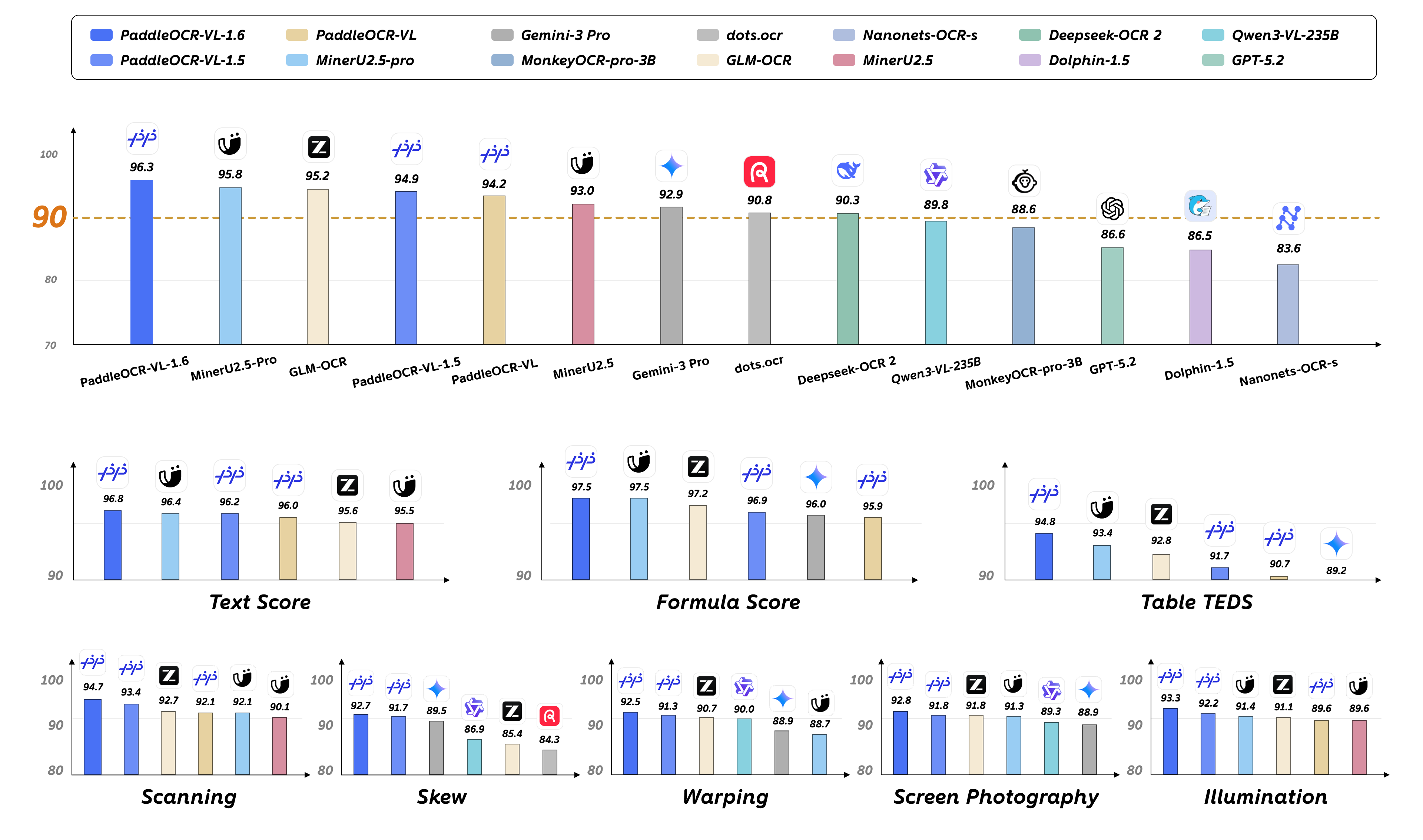
PaddleOCR-VL-1.6 further optimizes PaddleOCR-VL-1.5 by systematically analyzing under-optimized areas in the current model, applying targeted data optimization, and adopting refined post-training strategies. It achieves a new state-of-the-art (SOTA) result of 96.33% on the OmniDocBench v1.6 document parsing benchmark. PaddleOCR-VL-1.6 also reaches SOTA performance across all scenarios on Real5-OmniDocBench, a benchmark designed to evaluate robustness against real-world physical distortions. In addition, PaddleOCR-VL-1.6 outperforms PaddleOCR-VL-1.5 on three subtasks: seal recognition, text detection and recognition, and chart recognition, while still maintaining an ultra-compact 0.9B-parameter VLM and high efficiency.
Key Metrics:
Core Features:
- SOTA performance in document parsing: With only 0.9B parameters, PaddleOCR-VL-1.6 achieves 96.33% accuracy on OmniDocBench v1.6, surpassing the previous SOTA model, PaddleOCR-VL-1.5. Significant improvements are observed in table, formula, and text recognition.
- SOTA performance for document parsing across five real-world scenarios: PaddleOCR-VL-1.6 offers stronger robustness and practicality in real-world use cases. In evaluations across five real-world distortion scenarios—scanning, warping, skew, screen photography, and illumination variation—it outperforms mainstream open-source and closed-source models.
- Enhanced multi-element recognition capabilities: Beyond improved layout parsing, PaddleOCR-VL-1.6 substantially strengthens recognition of complex tables, ancient books, and rare Chinese characters, while further improving three existing capabilities: chart parsing, seal recognition, and text detection and recognition.
- Compact 0.9B architecture: PaddleOCR-VL-1.6 follows the compact 0.9B architecture of the PaddleOCR-VL series, enabling zero-cost adaptation and drop-in replacement.